|
****JavaScript
based drop down DHTML menu generated by NavStudio.
(OpenCube Inc. - http://www.opencube.com)****

|
|
|
- 3 Dispatch Boards
- CallerID Integration
- Crew Dispatching
- Parts on Dispatch
- Tutorial
Videos
|
Customer
Testimonials |
“Using
Electronic Service Control,
we are now able to handle more
service calls in a day which
has increased our profitability
and lowered overhead.”
Wendy, FL |
|
|
Features
for Dispatching
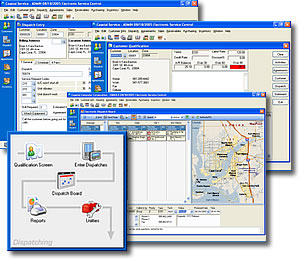
- Customer
Qualification
- Using the Qualification
screen, users can quickly access all pertinent
information about customer equipment, service
and billing history.
-
Dispatch Entry
- The Dispatch
Entry screen allows users to quickly set up
service calls based on priority, skill level,
dates and times. Using ESC’s Complaint
Codes you can quickly and accurately enter
service requests. The ability to store unlimited
notes allows dispatchers to enter specific
information for each circumstance.
-
New
Dispatch Boards
- You asked for
it; we delivered. Select from 3 all new
dispatch boards. The Dispatch View is
an update of our Classic board with dispatches
easily divided by day. Our Weekly View is
a complete redesign of the Time Blocks based
dispatch board using a horizontal display
to show more information at once. Drag and
drop scheduling with viewable conflicts
and technician hours make this board one
you are sure to use on a daily basis. Rounding
it all out is the Monthly View which lets
you see an entire month at a glance. Daily
status meters give you a quick indicator
of your workload while innovative drill
down features allow you to find an opening
in your schedule with ease.
All
the new dispatch boards feature a creative
hover view that allows you to see the details
of a dispatch simply by moving the mouse
over it. Additional features such as adjustable
height dispatch notes, easy viewing of completed
dispatches and new right-click options make
this the most intuitive dispatching software
on the market today.
- Integrated
Mapping
- ESC’s seamless
integration with Microsoft MapPoint allows
users to view all service calls in a geographical
area and organize them in the most efficient
manner, saving time, mileage, and money.
-
Email and Alpha Paging
- Users have the
ability to send all service calls to technicians
via alpha numeric paging or standard email.
This feature includes compatibility with desktop
computers, PDA’s, handheld computers,
web enabled phones, and standard alpha-numeric
pagers.
- Add
Parts to a Dispatch
- Ever have a tech
arrive at the job site without the parts needed
to complete it? Now you can reduce the possibilities
of that happening by entering the necessary
parts on the dispatch. Attached parts will
print on the dispatch ticket and will carry
over to sales when the dispatch is invoiced
to ensure nothing falls through the cracks.
- Crew
Dispatching
- This feature
allows you to group your technicians into
crews for easy assignment on dispatches. The
ability to track crew members time together
or separately ensures your labor cost
will be accurate. Unmatched flexibility allows
technicians to be reassigned to a different
crew quickly and easily.
|
|