Available Now - ESC Version 9

Throughout ESC, we have implemented many usability enhancements in version 9. We have converted and updated over 200 screens to the latest Microsoft .NET technology, as well as updated every report in ESC to a new reporting solution. These enhancements lay the groundwork for many new features in this release and future releases.
 

In addition, we added a new auto-fill combo box, the ability to have job statuses, and we have implemented Windows Authentication for greater security and Windows Vista compatibility.

    • Windows Vista-Compatible
    • Updated 200+ Screens
    • Updated Every Report in ESC
    • Added Standard Menu Bars
    • Implemented AutoFill Combo Boxes
    • Ability To Update System Setup Without Exiting Other Users
    • New Company Setup Wizard Redesigned
    • Ability to Mark Jobs Inactive
    • Ability to Assign Status to a Job
    • Implemented Windows Authentication for Enhanced Security
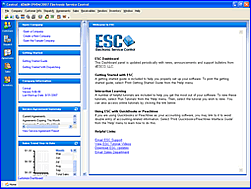
    • ESC Dashboard shows performance charts and graphs as well as web-based updates and announcements from dESCO


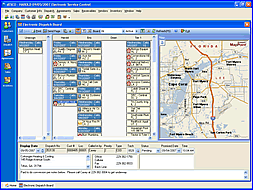
  ESC version 9 features the ability to dock and undock the mapping panel on the dispatch board in order to split the map onto a second monitor. ESC’s dispatch board also will display Non-Tech columns as well. You also now have the ability to create PO’s from within a dispatch, delivering greater ease of ordering parts for upcoming jobs. 

    • Dockable Map Window
    • Non-Tech Columns on Dispatch Board
    • Create a PO from a Dispatch


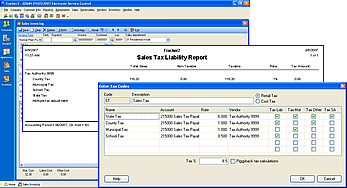
Another key feature of ESC version 9 is improved tax abilities including a newly-designed Tax Liability Report as well as the ability to name tax codes and support for a total of 6 tax codes. We have also improved the speed and performance of the QuickBooks interface as well as added a system message if you try to post invoices from any accounting period other than the current period. 
 

    • Support for 6 Tax Codes
    • Sales Tax Liability Report
    • Addition of Sales Tax Names to Tax Codes
    • Invoice Designer Supports Payment Due Date
    • Alert while posting to QuickBooks for Invoices from previous accounting periods


Another major enhancement in version 9 is the improved workflow for creating PO’s and managing parts-on-order for jobs. You can create a Purchase Order from the Quote or Dispatch screen and quickly and easily create single or multiple purchase orders with a few clicks of the mouse.

In addition, we have implemented a feature for use with the Warehouse Reorder report, giving you the ability to create purchase orders automatically based upon your warehouse min/max quantities. This feature allows you to create all the necessary Purchase Orders to restock your warehouse in one step.

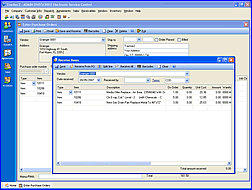
Version 9 also features an updated Purchase Order Entry screen which allows you to specify Item vs. Account, Dispatch Number, Department, Cost Type, and Job Class on a per line items basis.


    • Automated Creation of PO’s from Dispatch Entry
    • Automated Creation of PO’s from Sales Quote
    • Automated Creation of PO’s from Parts Reorder Report
    • Ability to See Parts on Order for a Dispatch or Quote
    • Added the ability to assign departments, dispatches, warehouses and jobs on a line by line breakdown on PO
    • Enter Purchase Orders using Items or Account numbers
    • A new Save-and-Receive feature and a new Save-and-Bill feature
    • Enter vendor credits
    • The ability to select dispatch and department per line item as well as cost type and job class. Now, when you have a job on a PO, the parts received can go to inventory, not directly to cost
    • Enter vendor receipts


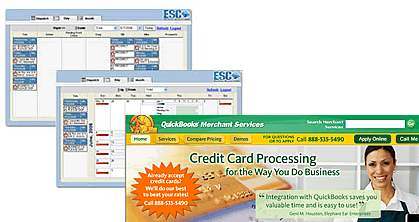
Another major feature in version 9 is the integration with QuickBooks Merchant Services for real-time credit card processing, and also major enhancements in ESC FrontOffice. ESC FrontOffice now allows users to enter new dispatches as well as edit existing dispatches from the web. ESC Mobile features integration to the QuickBooks Credit Card processing for real-time credit card processing from the field, with discounted swipe/card present rates. Integration with PoolCorp’s SourceDisk allows PoolCorp customers to import parts from the PoolCorp parts database.

    • Real-time Xora Updates
    • Integration with Intuit Merchant Services
    • Credit Card Processing/Swipe with Mobile
    • Integration with PoolCorp SourceDisk
    • ESC FrontOffice supports Entering and Editing a New Dispatch
    • ESC FrontOffice Speed Enhancements
    • SageQuest integration automatically creates GeoFences when an active dispatch is on the dispatch board


Available Now
ESC Version 8.1
dESCO is pleased to announce the release of Version 8.1 of our deluxe service software package, Electronic Service Control (ESC). Along with the already-robust features in the software, Version 8.1 has been enhanced with the following:

Enhanced Report Generation

ESC now allows you to create, print and email merge letters directly from the Report Generation screen. Take advantage of the information you've been collecting. Want to send a thank you to all customers you worked with this week, no problem. Or how about sending a service contract invitation to all customers that have equipment coming out of warranty this month. Now you can do all that and more without having to leave ESC. You can even automatically save a copy of the letters in the customer's record.

ESC

ESC

Automated Backup Utility

Don't get stuck without a good backup of your data! The new automated backup utility makes skipping backups a thing of the past. Simply set it and forget it. Your backup is made automatically on the server, even if it is not logged on.

Automatically Archive Old Documents

In Version 8 we allowed you to attach documents to customers. Now we help you manage your database size by giving you the ability to remove older documents from the database while still maintaining accessibility. This keeps your database fast and manageable while still giving you access to any document at any time.

ESC

ESC

Labor Rate Updates

Need to increase your labor rate? Now you can easily change labor rates for a whole group of customers by simply changing this new code assigned to them instead of having to change each customer individually.

Caller ID

Match incomming phone numbers to existing customers with this update of the Caller ID software. Not only does this break the 4 phone number per location barrier, it also allows you to label new phone numbers on the fly.

If you are not currently using Caller ID through ESC, additional hardware may be necessary.

ESC

Other Enhancements Include

  • Significant QuickBooks 2005 & 2006 speed improvements.
  • Improved readability of the EDB 7-day view. Separators help distinguish technicians more quickly.
  • The 7-day view can now be magnified up to 150%, 200% or 300%.
  • Ability to set the company address or the technician’s home address as the start or end point when using the Optimize Route feature. This greatly improves the time needed to determine most efficient routes.
  • Inclusion of Canadian addresses with Microsoft Mapping.
  • Addition of the “alt+down-arrow” key combination in the Display Date field to quickly display a calendar pop up on the EDB.
  • Ability to asses sales tax on a per line item basis on the Mobile Sales invoice.
  • Caller ID incoming telephone number now highlighted for easier recognition.
  • Improved performance and usability in the Report Generation Programs.
  • Ability to attach documents to a specific customer location.
  • Job search functionality improved to filter list as the job name is entered. Search can be further limited by customer.
  • Invoices created through the Enter Meter Reading screen now include the Starting Meter Reading, Amount Allowed and Ending Meter Reading.
  • Improved paging routines modified to work with Microsoft’s .NET framework 2.0 as well as .NET framework 1.1.

New Premium Features

The following features are also available in Version 8.1 for an additional fee. Please contact your salesperson at 800-226-7529 extension 1 for more details.

ESC

ESC Front Office

A new premium feature, the ESC Front Office is a web based dispatch board and customer communication center. Company employees can logon from anywhere to view and assign dispatches, change status and update dispatch notes. Customers can logon from their homes and offices to request service, which creates a dispatch immediately within ESC. They can also update their contact information, view equipment and service agreements and even pay their bill online.

SageQuest GPS Integration

Track the exact position of your trucks with this exceptional vehicle mounted GPS system. View the exact position of your vehicles on the Electronic Dispatch Board. Get detailed reporting on your fleet emailed to you automatically at particular times or when certain conditions are met (such as a technician speeding or taking a vehicle outside of a geofence you create).

ESC  
ESC

Xora TimeTrack Integration

Use GPS-Enabled Nextel cell phones to track your technicians' position directly on the dispatch board within ESC. Technicians can use the phones to download and view their dispatches as well as enter brief notes and update their status. Detailed GPS reports are also available through Xora's web interface.

Version 8.0 Enhancements

Attached Documents
Get rid of your filing cabinets! Any kind of file can now be attached to a customer's record and instantly recalled from any computer running ESC. For example, schematics can be attached to a dispatch, photos can be attached to equipment, CAD drawings can be attached to quotes/invoices, and Excel checklists can be attached to service agreements. A unified customer document list and detailed searches make finding that elusive document easy. Files are embedded directly in your database to make backing up all your critical data simple.

Built-in Word Processor
ESC now allows you to create letters to your customers directly from the Customer Entry screen. A full template system allows you to create detailed form letters and automatically pull in your customers' contact information. Formatting options include the ability to add graphics, bulleted/numbered lists, indents and more. After you spell check and print your finished letter, it is automatically saved as an attached document for that customer, so you can recall it at any time!

New Dispatch Boards
You asked for it; we delivered. Select from 3 all new dispatch boards. The Dispatch View is an update of our Classic board with dispatches easily divided by day. Our Weekly View is a complete redesign of the Time Blocks based dispatch board using a horizontal display to show more information at once. Elegant drag and drop scheduling with viewable conflicts and technician hours make this board one you are sure to use on a daily basis. Rounding it all out is the Monthly View which lets you see an entire month at a glance. Daily status meters give you a quick indicator of your workload while innovative drill down features allow you to find an opening in your schedule with ease.

All the new dispatch boards feature a creative hover view that allows you to see the details of a dispatch simply by moving the mouse over it. Additional features such as adjustable height dispatch notes, easy viewing of completed dispatches and new right-click options make this the most intuitive dispatching software on the market today.

Add Parts to a Dispatch
Ever have a tech arrive at the job site without the parts needed to complete it? Now you can reduce the possibilities of that happening by entering the necessary parts on the dispatch. Attached parts will print on the dispatch ticket and will carry over to sales when the dispatch is invoiced to ensure nothing falls through the cracks.

Crew Dispatching
This feature allows you to group your technicians into crews for easy assignment on dispatches. The ability to track crew members time together or separately ensures your labor cost will be accurate. Unmatched flexibility allows technicians to be reassigned to a different crew quickly and easily.

New Service Request Analysis Report
This report gives you a breakdown of the reason your customers call you. Now you can see the total number of dispatches related to a certain request code as well the percentage of your total business that represents.

Enhanced Route Optimizer
Minimize your technicians' driving time with the enhanced route optimizer. This feature calculates the driving time from dispatch to dispatch and rearranges them to create the most efficient route. Promised times are automatically calculated based on the length of time each dispatch should take and the drive time required to get from one to another.

Status Code Sorting
This feature lets you put your status codes in the order they will generally be used to streamline your processes and improve your work flow.

Caller ID
Automatically display your customer's information on the qualification screen when they call. Additional hardware and software are required.

Improved Qualification Screen Layout
See more information when your customers call you! Enhanced tab design expands the number of history and equipment records you can see at once. All new tabs let you see and instantly recall any dispatch (regardless of status) and/or attached documents for that customer.

Electronic Service Control has been the clear choice for service industry professionals for many years and this current release has solidified Electronic Service Control’s position as market leader. For more information, please call 800-226-7529.